Caching Strategies: Making Your System Lightning Fast

Caching Strategies: Making Your System Lightning Fast
Day 5 of the 30-Day System Design Roadmap
A startup I once consulted for was spending $40,000 a month on database servers. Their app was sluggish, users were complaining, and the engineering team was convinced they needed bigger servers. I asked them one question: "How many of your database reads are for the same data?"
They pulled up the query logs. Ninety-two percent of database reads were hitting the same 5% of rows—product listings, home page content, user profiles. The same data, fetched fresh from disk, thousands of times per second.
Two days after implementing a proper caching layer, their database load dropped by 80%. Their monthly server bill fell to $9,000. Their p95 response time went from 1.8 seconds to 120 milliseconds.
That's the power of caching done right.
Why Caching Exists
Here's a simple truth most tutorials skip: your database is slow, and it's supposed to be. Disk I/O is slow because durability is hard. Network round-trips add latency because physics. Complex SQL queries take time because joins are expensive.
Caching exists because reading the same data repeatedly from the source is wasteful. You pay the expensive cost once, store the result somewhere cheap and fast, and serve the stored result for every subsequent read.
Think of it like a chef who writes down a common recipe instead of reinventing it from scratch every morning. The first write costs a little time. Every subsequent read is instant.
The Cache Performance Equation
Understanding why caches are fast is important:
Database (PostgreSQL on SSD): ~1-5ms per query
Redis (in-memory):            ~0.1-0.3ms per operation
Local in-memory (application): ~0.001ms per lookup

At 10,000 requests/second:
- Without cache: 10,000 DB hits/sec → database overwhelmed
- With 95% cache hit rate: 500 DB hits/sec → database comfortable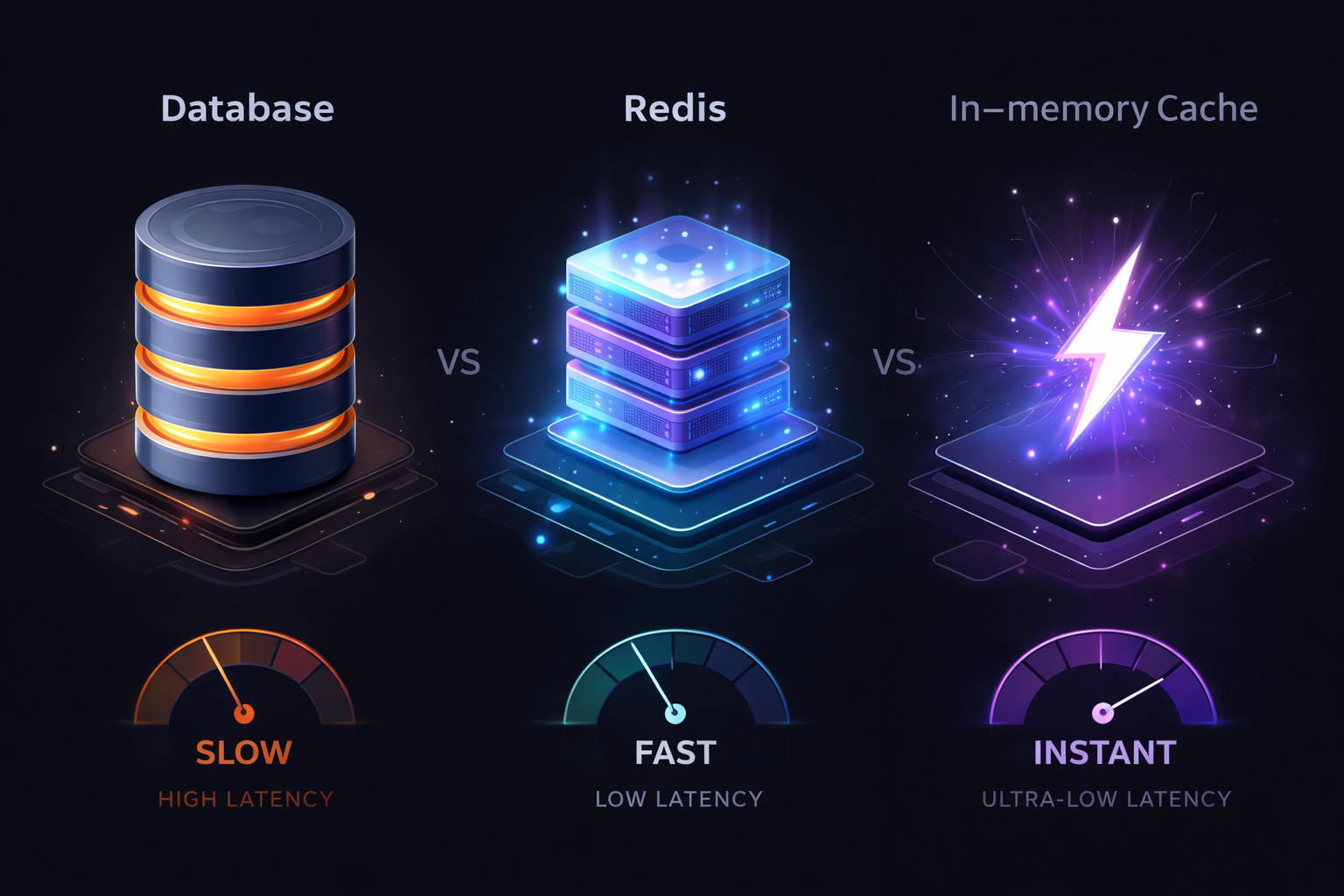
Even a modest 90% cache hit rate transforms your system. Those 10% misses go to the database, but now they have breathing room to respond fast.
Cache Types: Know Your Arsenal
Caches live at different layers of your system, and each layer serves a different purpose. Let's walk through them from closest-to-user to closest-to-data.
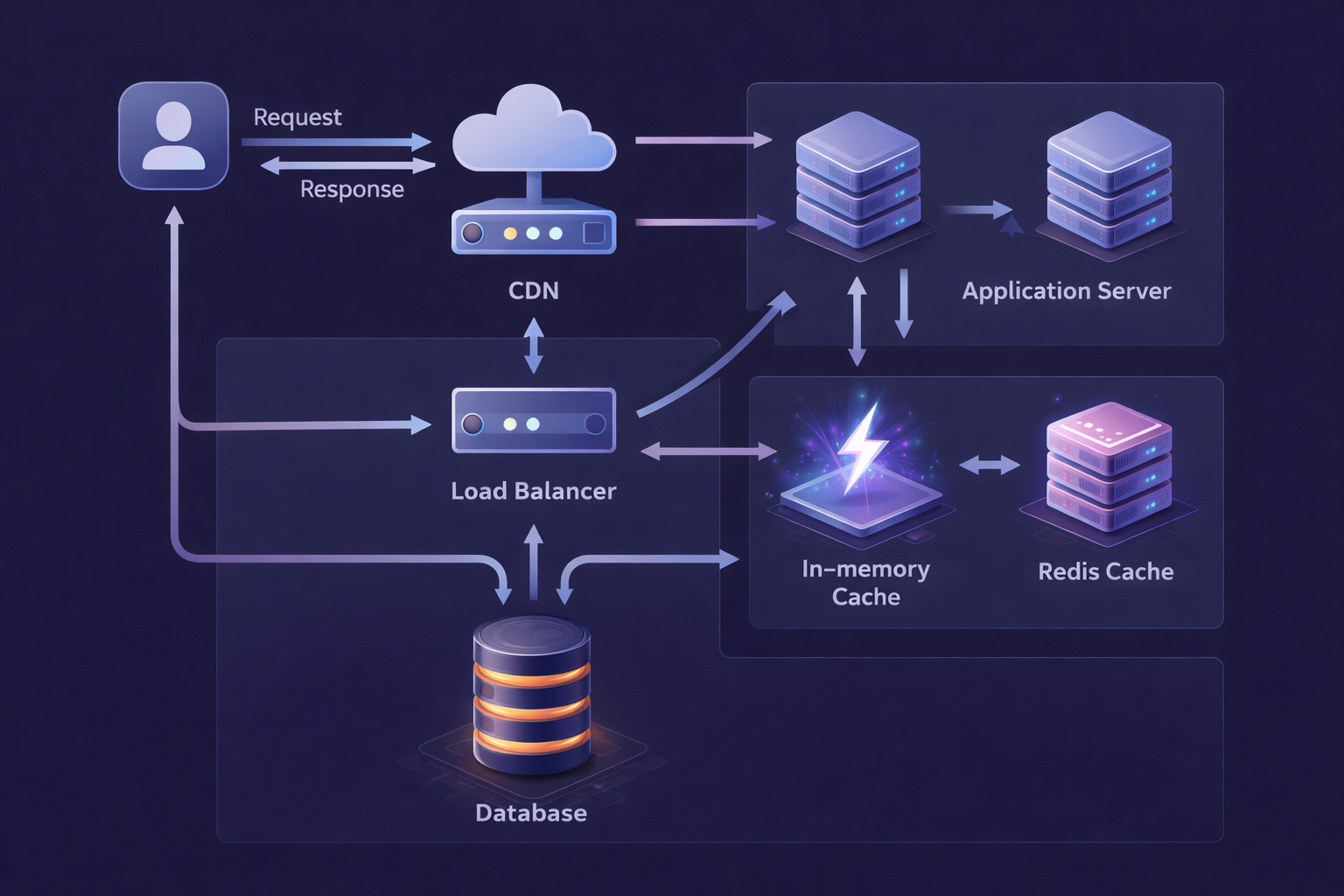
1. Browser Cache
The fastest cache is the one that requires no network request at all. Browsers cache static assets—images, JS, CSS—based on HTTP headers you control.
# NGINX: Aggressive caching for static assets
location ~* \.(js|css|png|jpg|jpeg|gif|ico|svg|woff2)$ {
    expires 1y;
    add_header Cache-Control "public, immutable";
    # 'immutable' tells the browser: don't even re-validate this file
    # If the URL contains a hash (e.g., main.a3f9b2.js), it will never change
}

# HTML: Short-lived, always revalidate
location / {
    expires -1;
    add_header Cache-Control "no-cache, must-revalidate";
}
The key trick here is cache-busting via content hashing. Your build pipeline generates main.a3f9b2.js where a3f9b2 is a hash of the file contents. When you deploy a new version, the hash changes, the URL changes, and the browser fetches fresh. Old URLs can be cached forever because they truly never change.
2. CDN (Content Delivery Network)
CDNs sit between your users and your servers, geographically distributed. A user in Mumbai gets content served from a nearby Mumbai edge node rather than from your servers in Virginia.
This reduces:
- Network latency (physics: closer = faster)
# Strategy: Use CDN for anything that can tolerate edge caching

# ✅ Good CDN candidates
# - Static assets (always)
# - API responses that are the same for all users (news feeds, product listings)
# - Images and media
# - Server-rendered HTML pages that don't require auth

# ❌ Bad CDN candidates
# - Authenticated endpoints (you'd cache one user's data and serve it to another)
# - Checkout flows
# - Real-time data (WebSockets, etc.)

# CloudFront example: Setting cache headers in your API response
from flask import Flask, jsonify, make_response

app = Flask(__name__)

@app.route('/api/articles/trending')
def trending_articles():
    articles = get_trending_articles()  # Expensive operation
    response = make_response(jsonify(articles))

    # Tell CDN: cache this for 60 seconds, but it's shared/public content
    response.headers['Cache-Control'] = 'public, max-age=60, s-maxage=60'

    # Cache-Tag allows you to invalidate groups of cached responses
    response.headers['Cache-Tag'] = 'articles,trending'

    return response

@app.route('/api/user/profile')
def user_profile():
    # Never let CDN cache personal data!
    profile = get_user_profile()
    response = make_response(jsonify(profile))
    response.headers['Cache-Control'] = 'private, no-store'
    return response
3. Application-Level Cache (In-Memory)
Your application process itself can hold a cache in RAM. This is the absolute fastest access path—no network, no serialization, just a Python dict or equivalent.
from functools import lru_cache
from cachetools import TTLCache
import threading

# Simple LRU cache for static configuration
@lru_cache(maxsize=1)
def get_app_config():
    """Config doesn't change at runtime. Cache forever."""
    return database.query("SELECT * FROM app_config")

# TTL-based cache for semi-dynamic data
_category_cache = TTLCache(maxsize=100, ttl=300)  # 5 minute TTL
_cache_lock = threading.Lock()

def get_categories():
    """Categories change rarely. Cache for 5 minutes."""
    cache_key = "all_categories"

    with _cache_lock:
        if cache_key in _category_cache:
            return _category_cache[cache_key]

        categories = database.query("SELECT * FROM categories ORDER BY name")
        _category_cache[cache_key] = categories
        return categories
The catch: In-memory caches don't survive process restarts, and if you run multiple server instances, each has its own cache. Two instances can have different cached values. For content this doesn't matter much; for user-specific data, it can cause inconsistencies.
4. Distributed Cache (Redis/Memcached)
Redis is the workhorse of production caching. It lives outside your application process, so all your server instances share the same cache state. It survives individual process restarts. It has rich data structures. It's fast enough for nearly anything.
import redis
import json
from functools import wraps

redis_client = redis.Redis(
    host='redis-cluster.internal',
    port=6379,
    decode_responses=True,
    socket_keepalive=True,
    health_check_interval=30
)

def cached(ttl=300, key_prefix=''):
    """
    Decorator for caching function results in Redis.
    Usage: @cached(ttl=60, key_prefix='article')
    """
    def decorator(func):
        @wraps(func)
        def wrapper(*args, **kwargs):
            # Build cache key from function name + arguments
            cache_key = f"{key_prefix}:{func.__name__}:{args}:{kwargs}"

            # Try cache first
            cached_result = redis_client.get(cache_key)
            if cached_result is not None:
                return json.loads(cached_result)

            # Cache miss - call the real function
            result = func(*args, **kwargs)

            # Store in cache
            redis_client.setex(cache_key, ttl, json.dumps(result, default=str))

            return result
        return wrapper
    return decorator

# Usage
@cached(ttl=300, key_prefix='article')
def get_article(article_id):
    return db.query("SELECT * FROM articles WHERE id = %s", article_id)

@cached(ttl=30, key_prefix='homepage')
def get_homepage_feed():
    # This is expensive - runs complex queries, aggregations
    return db.query("""
        SELECT a.*, u.name as author_name, COUNT(c.id) as comment_count
        FROM articles a
        JOIN users u ON a.author_id = u.id
        LEFT JOIN comments c ON a.id = c.article_id
        WHERE a.published = true
        GROUP BY a.id, u.name
        ORDER BY a.published_at DESC
        LIMIT 20
    """)
Caching Patterns: How Data Flows In and Out
Knowing where to put a cache is only half the battle. The other half is understanding _how_ data flows between the cache and your data source. Get this wrong and you end up with stale data, inconsistencies, or systems that are impossible to reason about.
Cache-Aside (Lazy Loading)
Cache-aside is the most common pattern. Your application code is responsible for loading and updating the cache. The cache never talks directly to the database.
Read path:
  1. Check cache → cache miss
  2. Read from database
  3. Write result to cache
  4. Return result

Write path:
  1. Write to database
  2. Invalidate or update cache entry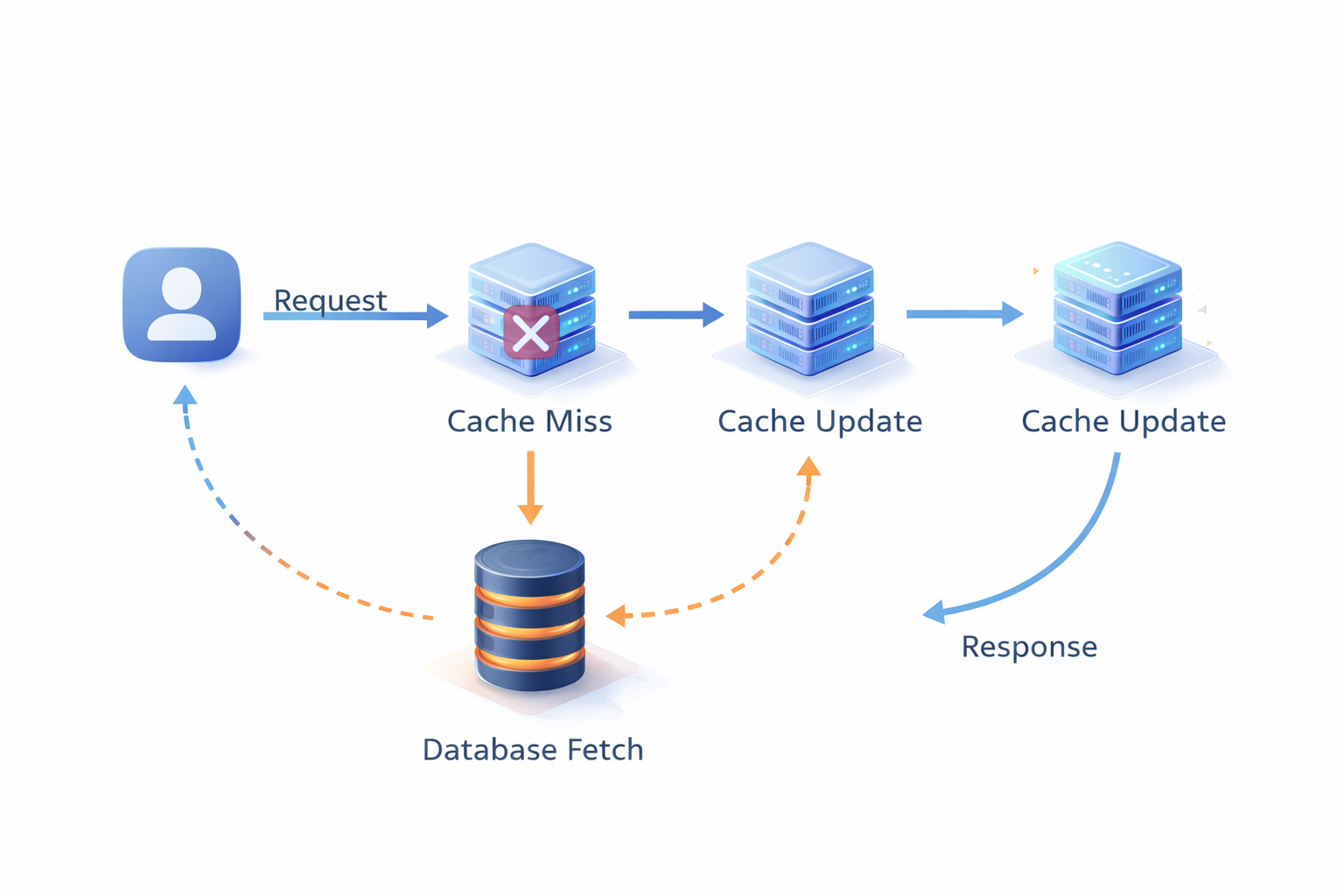
class ArticleRepository:
    def __init__(self, db, cache):
        self.db = db
        self.cache = cache

    def get_article(self, article_id: int) -> dict:
        """Cache-aside: application manages cache."""
        cache_key = f"article:{article_id}"

        # 1. Check cache
        cached = self.cache.get(cache_key)
        if cached:
            return json.loads(cached)

        # 2. Cache miss → fetch from DB
        article = self.db.query(
            "SELECT * FROM articles WHERE id = %s",
            (article_id,)
        )

        if article is None:
            # Cache negative results too! Prevents DB hammering on invalid IDs
            self.cache.setex(cache_key, 60, json.dumps(None))
            return None

        # 3. Populate cache
        self.cache.setex(cache_key, 3600, json.dumps(article))

        return article

    def update_article(self, article_id: int, data: dict):
        """On write: update DB, then invalidate cache."""
        self.db.execute(
            "UPDATE articles SET title = %s, content = %s WHERE id = %s",
            (data['title'], data['content'], article_id)
        )

        # Invalidate the cached entry
        # Next read will be a miss and fetch fresh data
self.cache.delete(f"article:{article_id}")Strengths:
- Cache only gets populated with data that's actually requested (no wasted memory)
Weakness: The first request after a cache miss (or after cache startup) hits the database. Under high load, this "thundering herd" problem can cause many simultaneous DB hits for the same popular key. We'll fix this shortly.
Write-Through
With write-through, every write to the database immediately updates the cache too. The cache is always current.
Write path:
  1. Write to cache
  2. Write to database (synchronously)
  3. Return success

Read path:
  1. Check cache → almost always a hit
  2. If miss: read from database, populate cache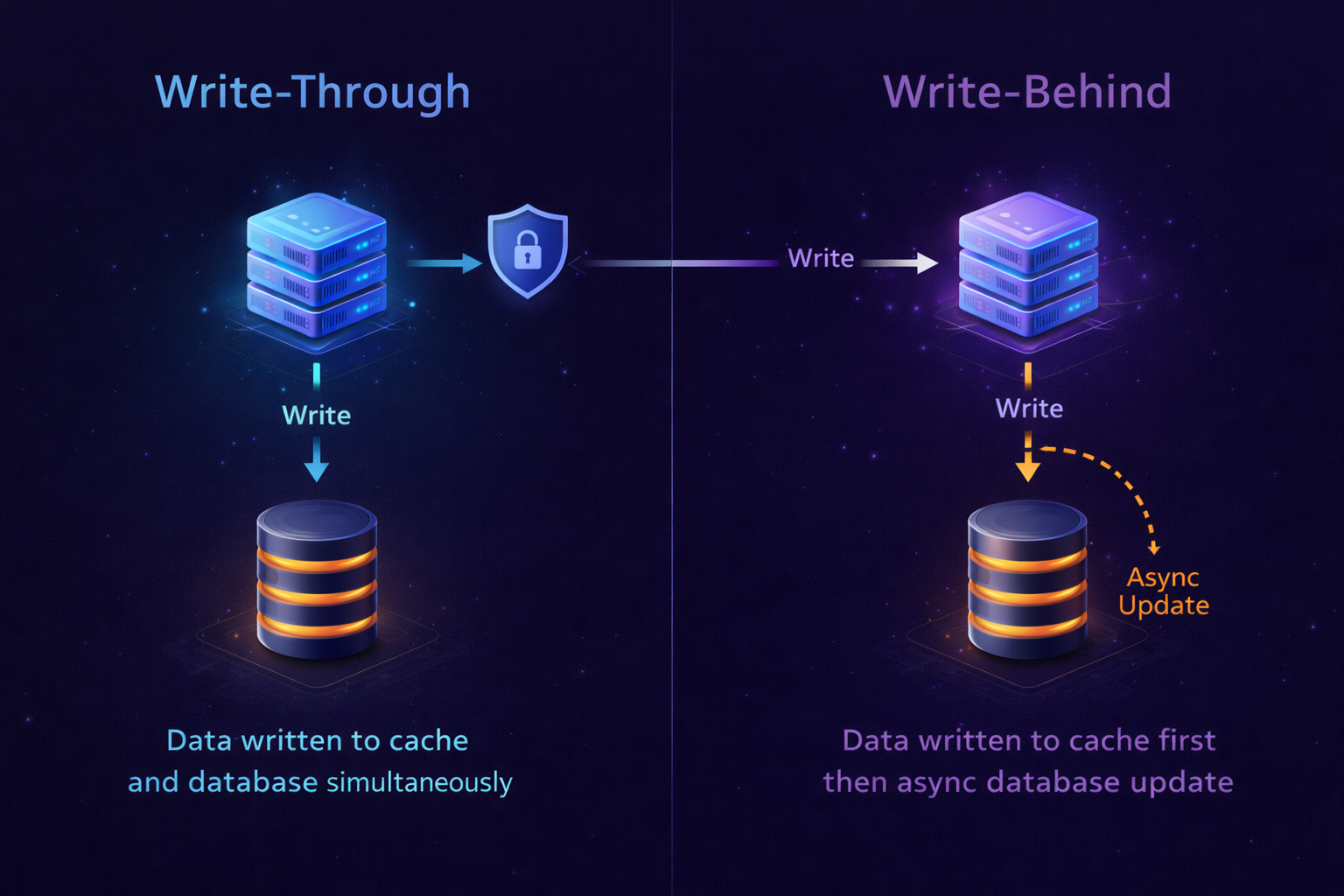
class UserProfileRepository:
    def __init__(self, db, cache):
        self.db = db
        self.cache = cache

    def update_profile(self, user_id: int, data: dict):
        """Write-through: update cache and DB together."""
        cache_key = f"user:{user_id}"

        # Merge with existing profile
        existing = self.get_profile(user_id)
        updated = {**existing, **data, 'updated_at': datetime.now().isoformat()}

        # 1. Write to DB
        self.db.execute(
            """UPDATE user_profiles
               SET name = %s, bio = %s, avatar_url = %s, updated_at = NOW()
               WHERE user_id = %s""",
            (updated['name'], updated['bio'], updated['avatar_url'], user_id)
        )

        # 2. Write to cache (TTL reset)
        self.cache.setex(cache_key, 3600, json.dumps(updated))

        return updated

    def get_profile(self, user_id: int) -> dict:
        """Read is almost always a cache hit."""
        cache_key = f"user:{user_id}"

        cached = self.cache.get(cache_key)
        if cached:
            return json.loads(cached)

        # Cold cache or eviction
        profile = self.db.query(
            "SELECT * FROM user_profiles WHERE user_id = %s",
            (user_id,)
        )
        self.cache.setex(cache_key, 3600, json.dumps(profile))
return profileStrengths:
- Cache is always fresh—no stale reads
Weakness: Writes are slower because they must succeed in two places. If you write data that's never read again, you wasted cache space and write latency.
Best for: User profiles, account settings, data that is read far more than written and where stale reads are problematic.
Write-Behind (Write-Back)
Write-behind is the high-performance variant: writes go to the cache first, then get asynchronously flushed to the database in batches.
Write path:
  1. Write to cache immediately → return success to user
  2. Queue write for async DB flush

Async background:
3. Batch writes and flush to database periodicallyimport asyncio
from collections import defaultdict
from datetime import datetime
class WriteBackArticleStats:
"""
Article view counts: updated millions of times/day.
We can tolerate a few seconds of lag.
"""
def __init__(self, db, cache):
self.db = db
self.cache = cache
self.dirty_keys = set()
self._flush_task = None
async def increment_view_count(self, article_id: int):
"""Instant return—write goes to cache only."""
cache_key = f"article:views:{article_id}"
# Atomic increment in Redis
new_count = self.cache.incr(cache_key)
# Mark as dirty for DB flush
self.dirty_keys.add(article_id)
# Schedule flush if not already scheduled
if self._flush_task is None or self._flush_task.done():
self._flush_task = asyncio.create_task(
self._scheduled_flush(delay_seconds=5)
)
return new_count
async def _scheduled_flush(self, delay_seconds: int):
"""Flush dirty keys to DB every N seconds."""
await asyncio.sleep(delay_seconds)
await self._flush_to_db()
async def _flush_to_db(self):
"""Batch update all dirty keys in one query."""
if not self.dirty_keys:
return
# Grab the dirty set and clear it atomically
keys_to_flush = self.dirty_keys.copy()
self.dirty_keys.clear()
# Fetch current counts from cache
updates = []
for article_id in keys_to_flush:
count = self.cache.get(f"article:views:{article_id}")
if count:
updates.append((int(count), article_id))
# One batch SQL instead of N individual queries
if updates:
self.db.executemany(
"UPDATE articles SET view_count = %s WHERE id = %s",
updates
)
print(f"Flushed {len(updates)} view counts to DB")Strengths:
- Extremely high write throughput (writes hit memory, not disk)
Weaknesses:
- Data lives in cache before reaching the database—if the cache crashes, you lose recent writes
- Complexity: your application now has an async data pipeline to maintain
Best for: Non-critical counters (views, likes), analytics events, any metric where losing a few seconds of data is acceptable.
Read-Through
In read-through, the cache itself is responsible for fetching from the database on a miss. The application always talks to the cache, never directly to the database.
class ReadThroughCache:
    """
    The cache handles DB loading transparently.
    Application code only talks to the cache.
    """

    def __init__(self, cache_client, db_loader, ttl=3600):
        self.cache = cache_client
        self.db_loader = db_loader  # Function to load from DB
        self.ttl = ttl

    def get(self, key: str):
        """Application calls this. Cache handles the rest."""
        value = self.cache.get(key)

        if value is None:
            # Cache miss: load from DB
            value = self.db_loader(key)
            if value is not None:
                self.cache.setex(key, self.ttl, json.dumps(value))

        return json.loads(value) if value else None

# Usage: application code is clean, no cache logic
article_cache = ReadThroughCache(
    cache_client=redis_client,
    db_loader=lambda key: db.query(
        "SELECT * FROM articles WHERE id = %s",
        (key.split(':')[1],)  # "article:42" → 42
    ),
    ttl=3600
)

# Application has no idea whether this came from cache or DB
article = article_cache.get("article:42")
Cache Invalidation: The Hard Problem
There's a famous quote in computer science:
> > > "There are only two hard things in Computer Science: cache invalidation and naming things." — Phil Karlton
It's funny because it's painfully true. Let me explain why, and how to handle it.

The Stale Data Problem
Every time your source data changes, your cache might be serving old data. How long that's acceptable depends on your use case.
News article title changes → cache shows old title
           ↓
How long is "old title" okay to serve?
- Breaking news: 0 seconds (invalidate immediately)
- Blog post slug: Maybe 24 hours is fine
- Static reference data (country list): Weeks
Strategy 1: TTL-Based Expiration
Set a Time-To-Live on every cached value. After the TTL expires, the next request is a cache miss and fetches fresh data.
# Different TTLs for different data volatility

CACHE_TTLS = {
    'breaking_news': 30,        # 30 seconds
    'article': 3600,            # 1 hour
    'user_profile': 1800,       # 30 minutes
    'homepage_feed': 60,        # 1 minute
    'static_pages': 86400,      # 24 hours
    'country_list': 604800,     # 7 days
}

def cache_with_appropriate_ttl(key: str, value: any, data_type: str):
    ttl = CACHE_TTLS.get(data_type, 300)  # Default: 5 minutes
    redis_client.setex(key, ttl, json.dumps(value, default=str))
TTL-based expiration is simple but imprecise. Data might be stale for up to TTL seconds. For many use cases, that's fine.
Strategy 2: Event-Driven Invalidation
When data changes in the source, explicitly delete the cached entry. The next read will fetch fresh data and repopulate the cache.
from typing import List

class CacheInvalidator:
    """
    Listens to domain events and invalidates affected cache keys.
    """

    def __init__(self, cache):
        self.cache = cache

    def on_article_updated(self, article_id: int):
        """Article changed—invalidate all related cache entries."""
        keys_to_invalidate = [
            f"article:{article_id}",
            f"article:related:{article_id}",
            "homepage_feed",                    # Homepage might show this article
            f"author:articles:{self._get_author_id(article_id)}",
        ]
        self._delete_keys(keys_to_invalidate)

    def on_user_followed(self, follower_id: int, followee_id: int):
        """Follow event invalidates both users' feed caches."""
        self._delete_pattern(f"feed:{follower_id}:*")

    def on_article_published(self, article_id: int, category_id: int):
        """New article invalidates feeds and category pages."""
        keys_to_invalidate = [
            "homepage_feed",
            f"category_feed:{category_id}",
            "trending_articles",
        ]
        self._delete_keys(keys_to_invalidate)

    def _delete_keys(self, keys: List[str]):
        if keys:
            self.cache.delete(*keys)

    def _delete_pattern(self, pattern: str):
        """Delete all keys matching a pattern (use sparingly—can be slow)."""
        keys = self.cache.keys(pattern)
        if keys:
            self.cache.delete(*keys)
Event-driven invalidation is precise—cache is never stale after a write. But it requires you to track every place that updates your source data, which can be error-prone.
Strategy 3: Cache Tags / Surrogate Keys
A powerful pattern where you tag cached items, then invalidate by tag. Popularized by CDNs like Cloudflare and Fastly.
class TaggedCache:
    """
    Cache entries are tagged. Invalidate all entries with a given tag.
    """

    def __init__(self, cache):
        self.cache = cache

    def set(self, key: str, value: any, tags: List[str], ttl=3600):
        """Store value and register under its tags."""
        self.cache.setex(key, ttl, json.dumps(value, default=str))

        # Register the key under each tag
        for tag in tags:
            tag_key = f"tag:{tag}"
            self.cache.sadd(tag_key, key)
            self.cache.expire(tag_key, ttl + 60)  # Tag lives slightly longer

    def get(self, key: str):
        value = self.cache.get(key)
        return json.loads(value) if value else None

    def invalidate_tag(self, tag: str):
        """Invalidate every cache entry associated with this tag."""
        tag_key = f"tag:{tag}"
        keys = self.cache.smembers(tag_key)

        if keys:
            self.cache.delete(*keys)
        self.cache.delete(tag_key)

# Usage
tagged_cache = TaggedCache(redis_client)

# Store article with tags
tagged_cache.set(
    key=f"article:{article_id}",
    value=article_data,
    tags=[f"article:{article_id}", f"category:{category_id}", "articles"]
)

# Store category page, also tagged
tagged_cache.set(
    key=f"category_page:{category_id}",
    value=page_data,
    tags=[f"category:{category_id}", "pages"]
)

# Article updated: invalidate everything tagged with this article
tagged_cache.invalidate_tag(f"article:{article_id}")

# Article published in new category: invalidate the category
tagged_cache.invalidate_tag(f"category:{category_id}")
The Thundering Herd Problem and How to Solve It
Imagine a popular article is cached. 10,000 users are reading it. The TTL expires. Suddenly, all 10,000 concurrent requests hit the database simultaneously. The database collapses under the load.
This is the thundering herd (or cache stampede) problem.
import time
import threading

class StampedeProtectedCache:
    """
    Uses Redis locks to ensure only one request rebuilds a cache entry.
    Other requests wait (or get stale data) while the rebuild happens.
    """

    def __init__(self, cache, lock_timeout=10):
        self.cache = cache
        self.lock_timeout = lock_timeout

    def get_or_compute(self, key: str, compute_fn, ttl=3600):
        # Try cache first
        value = self.cache.get(key)
        if value is not None:
            return json.loads(value)

        # Cache miss — try to acquire rebuild lock
        lock_key = f"lock:{key}"
        lock_acquired = self.cache.set(
            lock_key, "1",
            ex=self.lock_timeout,
            nx=True  # Only set if not exists (atomic)
        )

        if lock_acquired:
            try:
                # We have the lock — rebuild the cache
                result = compute_fn()
                self.cache.setex(key, ttl, json.dumps(result, default=str))
                return result
            finally:
                self.cache.delete(lock_key)
        else:
            # Someone else is rebuilding — wait a bit and retry
            time.sleep(0.1)
            value = self.cache.get(key)
            if value:
                return json.loads(value)
            # Still empty (compute took too long) — fallback to DB directly
            return compute_fn()

# Usage
protected_cache = StampedeProtectedCache(redis_client)

def get_trending_articles():
    return protected_cache.get_or_compute(
        key="trending_articles",
        compute_fn=lambda: db.query(expensive_trending_query),
        ttl=60
    )
CDN and Edge Caching
For global applications, the speed of light is a real constraint. A user in Singapore requesting data from a server in New York will experience ~170ms of network latency before your application even sees the request.
CDNs solve this by caching responses at edge nodes physically close to your users.
Setting Cache Headers Correctly
The CDN respects Cache-Control headers you set. Getting these right is critical.
from flask import Flask, jsonify, make_response
from datetime import datetime, timezone

app = Flask(__name__)

@app.route('/api/articles/<int:article_id>')
def get_article(article_id):
    article = fetch_article(article_id)

    if article is None:
        response = make_response(jsonify({'error': 'Not found'}), 404)
        # Cache 404s briefly to avoid repeated DB lookups for bad IDs
        response.headers['Cache-Control'] = 'public, max-age=30'
        return response

    response = make_response(jsonify(article))

    # Cache for 5 minutes at CDN, 1 hour in browser
    # 's-maxage' overrides 'max-age' for shared caches (CDN, proxies)
    response.headers['Cache-Control'] = 'public, max-age=3600, s-maxage=300'

    # ETag allows conditional requests (If-None-Match)
    response.headers['ETag'] = f'"{article["updated_at"].timestamp()}"'

    # Last-Modified for conditional requests (If-Modified-Since)
    response.headers['Last-Modified'] = article['updated_at'].strftime(
        '%a, %d %b %Y %H:%M:%S GMT'
    )

    return response

@app.route('/api/user/dashboard')
def user_dashboard():
    # Personal data: never cache at CDN
    data = fetch_user_dashboard()
    response = make_response(jsonify(data))
    response.headers['Cache-Control'] = 'private, no-store'
    return response

@app.route('/api/articles/breaking')
def breaking_news():
    news = fetch_breaking_news()
    response = make_response(jsonify(news))
    # Breaking news: short CDN cache, no browser cache
    response.headers['Cache-Control'] = 'public, max-age=0, s-maxage=30'
    response.headers['Surrogate-Key'] = 'breaking-news articles'
    return response
CDN Cache Invalidation
When you publish or update content, you need to purge the CDN cache. Most CDN providers offer an API for this.
import httpx

class CloudflareCachePurger:
    """Purge specific URLs or tags from Cloudflare's CDN cache."""

    def __init__(self, zone_id: str, api_token: str):
        self.zone_id = zone_id
        self.api_token = api_token
        self.base_url = f"https://api.cloudflare.com/client/v4/zones/{zone_id}/purge_cache"
        self.headers = {"Authorization": f"Bearer {api_token}"}

    def purge_urls(self, urls: List[str]):
        """Purge specific URLs from CDN cache."""
        response = httpx.post(
            self.base_url,
            headers=self.headers,
            json={"files": urls}
        )
        return response.json()

    def purge_by_tag(self, tags: List[str]):
        """Purge all cached responses with given Cache-Tag headers."""
        response = httpx.post(
            self.base_url,
            headers=self.headers,
            json={"tags": tags}
        )
        return response.json()

# Usage: When an article is updated
purger = CloudflareCachePurger(zone_id="abc123", api_token="token_here")

def on_article_updated(article_id: int, article_slug: str):
    # Purge specific URLs
    purger.purge_urls([
        f"https://news.example.com/articles/{article_slug}",
        f"https://api.example.com/api/articles/{article_id}",
    ])

    # Purge by tag (all responses tagged 'articles' and the specific article)
    purger.purge_by_tag(["articles", f"article-{article_id}"])
Practical Project: Multi-Level Caching for a News Website
Let's put it all together. Here's a complete multi-level caching strategy for a news website with the following requirements:
- Millions of daily readers
Architecture Overview
User Request
     │
     ▼
[CDN Edge Node] ──── Cache Hit? ──► Return Response
     │ Miss
     ▼
[NGINX / Load Balancer]
     │
     ▼
[Application Server]
     │
     ├── [In-Process Cache] ──── Cache Hit? ──► Return
     │       │ Miss
     ▼       ▼
[Redis Cluster] ──── Cache Hit? ──► Return
     │ Miss
     ▼
[PostgreSQL Primary DB]
     │
     └── Write result back up the chain
Implementation
import redis
import json
import hashlib
from datetime import datetime
from typing import Optional, Any, List
from dataclasses import dataclass, asdict
from functools import lru_cache
from cachetools import TTLCache
import threading

# ─── Configuration ────────────────────────────────────────────────────────────

@dataclass
class CacheConfig:
    # TTLs by content type (seconds)
    article_ttl: int = 3600           # 1 hour
    homepage_feed_ttl: int = 60       # 1 minute
    category_feed_ttl: int = 120      # 2 minutes
    breaking_news_ttl: int = 30       # 30 seconds
    user_profile_ttl: int = 300       # 5 minutes (private)
    search_results_ttl: int = 300     # 5 minutes

    # In-process cache sizes
    local_cache_maxsize: int = 500
    local_cache_ttl: int = 30         # Shorter: process-local can drift

config = CacheConfig()

# ─── Cache Layers ──────────────────────────────────────────────────────────────

class LocalCache:
    """
    Layer 1: In-process memory cache.
    Fastest possible access. Per-process. Short TTL to reduce drift.
    """
    def __init__(self):
        self._store = TTLCache(
            maxsize=config.local_cache_maxsize,
            ttl=config.local_cache_ttl
        )
        self._lock = threading.Lock()

    def get(self, key: str) -> Optional[Any]:
        with self._lock:
            return self._store.get(key)

    def set(self, key: str, value: Any):
        with self._lock:
            self._store[key] = value

    def delete(self, key: str):
        with self._lock:
            self._store.pop(key, None)


class RedisCache:
    """
    Layer 2: Distributed Redis cache.
    Shared across all app instances. Survives restarts.
    """
    def __init__(self, client):
        self.client = client

    def get(self, key: str) -> Optional[Any]:
        value = self.client.get(key)
        return json.loads(value) if value else None

    def set(self, key: str, value: Any, ttl: int):
        self.client.setex(key, ttl, json.dumps(value, default=str))

    def delete(self, *keys: str):
        if keys:
            self.client.delete(*keys)

    def delete_pattern(self, pattern: str):
        keys = self.client.keys(pattern)
        if keys:
            self.client.delete(*keys)

    def acquire_lock(self, key: str, timeout: int = 10) -> bool:
        return bool(self.client.set(f"lock:{key}", "1", ex=timeout, nx=True))

    def release_lock(self, key: str):
        self.client.delete(f"lock:{key}")


# ─── Article Service with Multi-Level Caching ─────────────────────────────────

class ArticleService:

    def __init__(self, db, local_cache: LocalCache, redis_cache: RedisCache):
        self.db = db
        self.local = local_cache
        self.redis = redis_cache

    def get_article(self, article_id: int) -> Optional[dict]:
        cache_key = f"article:{article_id}"

        # Layer 1: In-process cache (fastest, ~0.001ms)
        result = self.local.get(cache_key)
        if result is not None:
            return result

        # Layer 2: Redis cache (~0.2ms)
        result = self.redis.get(cache_key)
        if result is not None:
            # Backfill L1 cache
            self.local.set(cache_key, result)
            return result

        # Layer 3: Database (~3ms)
        result = self._fetch_article_from_db(article_id)
        if result:
            self.redis.set(cache_key, result, ttl=config.article_ttl)
            self.local.set(cache_key, result)

        return result

    def _fetch_article_from_db(self, article_id: int) -> Optional[dict]:
        return self.db.query_one("""
            SELECT
                a.*,
                u.name AS author_name,
                u.avatar_url AS author_avatar,
                c.name AS category_name,
                COUNT(DISTINCT cm.id) AS comment_count,
                COUNT(DISTINCT l.id) AS like_count
            FROM articles a
            JOIN users u ON a.author_id = u.id
            JOIN categories c ON a.category_id = c.id
            LEFT JOIN comments cm ON a.id = cm.article_id
            LEFT JOIN likes l ON a.id = l.article_id
            WHERE a.id = %s AND a.published = true
            GROUP BY a.id, u.name, u.avatar_url, c.name
        """, (article_id,))

    def get_homepage_feed(self, page: int = 1) -> List[dict]:
        """Homepage is public, heavily cached."""
        cache_key = f"homepage_feed:{page}"

        # Skip L1 for paginated feeds (too many variants)
        result = self.redis.get(cache_key)
        if result:
            return result

        # Stampede protection for homepage
        if not self.redis.acquire_lock(cache_key):
            import time; time.sleep(0.1)
            return self.redis.get(cache_key) or []

        try:
            per_page = 20
            offset = (page - 1) * per_page
            result = self.db.query("""
                SELECT a.id, a.title, a.slug, a.excerpt, a.published_at,
                       a.hero_image_url, u.name AS author_name,
                       c.name AS category_name
                FROM articles a
                JOIN users u ON a.author_id = u.id
                JOIN categories c ON a.category_id = c.id
                WHERE a.published = true
                ORDER BY a.published_at DESC
                LIMIT %s OFFSET %s
            """, (per_page, offset))

            self.redis.set(cache_key, result, ttl=config.homepage_feed_ttl)
            return result
        finally:
            self.redis.release_lock(cache_key)

    def get_breaking_news(self) -> List[dict]:
        """Breaking news: very short cache, CDN bypassed."""
        cache_key = "breaking_news"

        result = self.redis.get(cache_key)
        if result:
            return result

        result = self.db.query("""
            SELECT id, title, slug, published_at
            FROM articles
            WHERE published = true AND is_breaking = true
              AND published_at > NOW() - INTERVAL '6 hours'
            ORDER BY published_at DESC
            LIMIT 5
        """)

        self.redis.set(cache_key, result, ttl=config.breaking_news_ttl)
        return result

    def publish_article(self, article_data: dict) -> dict:
        """On publish: write to DB, invalidate related caches."""
        # Insert into DB
        article = self.db.execute("""
            INSERT INTO articles (title, slug, content, author_id, category_id,
                                  published, published_at, is_breaking)
            VALUES (%s, %s, %s, %s, %s, true, NOW(), %s)
            RETURNING *
        """, (
            article_data['title'], article_data['slug'],
            article_data['content'], article_data['author_id'],
            article_data['category_id'], article_data.get('is_breaking', False)
        ))

        # Invalidate homepage feeds (all pages)
        self.redis.delete_pattern("homepage_feed:*")

        # Invalidate category feed
        self.redis.delete(f"category_feed:{article['category_id']}:*")

        # Invalidate breaking news if applicable
        if article_data.get('is_breaking'):
            self.redis.delete("breaking_news")

        # Populate cache with the new article immediately
        self.redis.set(
            f"article:{article['id']}",
            article,
            ttl=config.article_ttl
        )

        return article

    def update_article(self, article_id: int, updates: dict) -> dict:
        """On update: write to DB, invalidate caches."""
        article = self.db.execute("""
            UPDATE articles SET title=%s, content=%s, updated_at=NOW()
            WHERE id=%s RETURNING *
        """, (updates['title'], updates['content'], article_id))

        # Invalidate everywhere this article might be cached
        self.local.delete(f"article:{article_id}")
        self.redis.delete(
            f"article:{article_id}",
            "homepage_feed:1",  # Article might be on first page
            f"category_feed:{article['category_id']}:1"
        )

        return article


# ─── HTTP Layer: Setting CDN Cache Headers ────────────────────────────────────

from flask import Flask, jsonify, make_response, request, g

app = Flask(__name__)

article_service = ArticleService(
    db=db_connection,
    local_cache=LocalCache(),
    redis_cache=RedisCache(redis.Redis(host='redis.internal'))
)

@app.route('/articles/<slug>')
def article_page(slug):
    article = article_service.get_article_by_slug(slug)
    if not article:
        resp = make_response("Not Found", 404)
        resp.headers['Cache-Control'] = 'public, max-age=30, s-maxage=30'
        return resp

    resp = make_response(render_template('article.html', article=article))

    # Cache-Control: public (CDN can cache), 1hr browser, 5min CDN
    resp.headers['Cache-Control'] = 'public, max-age=3600, s-maxage=300'

    # Surrogate-Key for tag-based CDN invalidation
    resp.headers['Surrogate-Key'] = (
        f"article article-{article['id']} "
        f"category-{article['category_id']}"
    )

    return resp

@app.route('/api/breaking-news')
def breaking_news_api():
    news = article_service.get_breaking_news()
    resp = make_response(jsonify(news))
    # Breaking news: 30 sec CDN, no browser cache
    resp.headers['Cache-Control'] = 'public, max-age=0, s-maxage=30'
    return resp

@app.route('/api/user/feed')
def user_feed():
    # Personalized: NEVER cache at CDN
    user_id = get_current_user_id()
    feed = get_personalized_feed(user_id)
    resp = make_response(jsonify(feed))
    resp.headers['Cache-Control'] = 'private, no-store'
    return resp
Monitoring Cache Health
A caching layer you can't observe is a caching layer you can't trust.
import time
from prometheus_client import Counter, Histogram, Gauge

# Metrics
cache_hits = Counter('cache_hits_total', 'Cache hits', ['layer', 'cache_key_prefix'])
cache_misses = Counter('cache_misses_total', 'Cache misses', ['layer', 'cache_key_prefix'])
cache_latency = Histogram('cache_operation_duration_seconds', 'Cache op latency', ['layer', 'operation'])
cache_hit_ratio = Gauge('cache_hit_ratio', 'Hit ratio by cache type', ['layer'])

class InstrumentedRedisCache(RedisCache):
    def get(self, key: str) -> Optional[Any]:
        start = time.time()
        result = super().get(key)
        duration = time.time() - start

        prefix = key.split(':')[0]
        cache_latency.labels(layer='redis', operation='get').observe(duration)

        if result is not None:
            cache_hits.labels(layer='redis', cache_key_prefix=prefix).inc()
        else:
            cache_misses.labels(layer='redis', cache_key_prefix=prefix).inc()

        return result
Common Mistakes and How to Avoid Them
Mistake 1: Caching Everything
Not all data should be cached. Caching adds complexity, memory usage, and staleness risk. Only cache:
- Data that's expensive to compute
Mistake 2: Never Expiring Cache Entries
Always set a TTL. Even for "static" data, a TTL ensures you eventually recover from inconsistencies.
# Bad: cache entry lives forever
redis_client.set("app_config", config_data)

# Good: even slow-changing data gets a TTL
redis_client.setex("app_config", 86400, config_data)  # 24 hours
Mistake 3: Using Mutable Cache Keys
If your cache key can refer to different data over time, you'll serve stale data.
# Bad: key doesn't capture the version of the data
key = f"article:{article_id}"  # What article version?

# Better: include a version or ETag in the key
key = f"article:{article_id}:v{article['version']}"

# Or use event-driven invalidation instead of versioned keys
Mistake 4: Caching Partial Data
Cache complete, ready-to-serve data. Don't cache something that requires additional DB fetches to be useful.
# Bad: caching article IDs, then fetching each separately
article_ids = cache.get("homepage_ids")  # [1, 2, 3, 4, 5]
articles = [fetch_article(id) for id in article_ids]  # 5 separate DB hits!

# Good: cache the complete feed
homepage_feed = cache.get("homepage_feed")  # Complete data, ready to serve
Key Takeaways
1. Caching is a trade-off between freshness and speed. Understand how stale your data can be before choosing a TTL.
2. Use multiple cache layers. In-process cache for the hottest data, Redis for shared state, CDN for public HTTP responses.
3. Choose the right pattern. Cache-aside for most cases, write-through for frequently-read writes, write-behind for high-throughput counters.
4. Cache invalidation is the hard part. Event-driven invalidation is more precise than TTL alone. Use cache tags when you need to invalidate groups of related keys.
5. Protect against thundering herds. Use locks or probabilistic early recomputation to prevent simultaneous cache rebuilds.
6. Never cache personal data at the CDN. Use Cache-Control: private, no-store for any response tied to a user session.
7. Instrument everything. If you can't see your hit rate, you're flying blind.
What's Next?
We've solved the read scalability problem with caching. But here's a new challenge: what happens when you have hundreds of operations that shouldn't block the user—sending welcome emails, processing payments, resizing uploaded images?
In Day 6: Message Queues & Async Processing, we'll learn how to decouple your system using queues, handle background jobs reliably, and design event-driven architectures that scale gracefully under load.
---
Resources:
Practice Exercise: Take the news website implementation above and add:
1. A cache warming script that pre-populates Redis on deploy
2. A cache health endpoint that reports hit rate per key prefix
3. Implement probabilistic early expiration to prevent stampedes
Building these additions will solidify every concept from this post.
Related Articles
Database Design Patterns: Choosing the Right Data Store
Master database selection strategies, from SQL to NoSQL. Learn ACID properties, CAP theorem, and design a production-ready database schema for a social media platform.
Load Balancing: Distributing Traffic Like a Pro
Master load balancing strategies, algorithms, and implementation patterns. Learn Layer 4 vs Layer 7 load balancing, health checks, and how to design robust traffic distribution for high availability.